DriveHQ'sfeature works like a mail drop box in a post office, allowing anybody to quickly and
easily upload files to you securely. Once a "" folder is created, simply share/publish theURL.
Anybody can visit the URL and upload files into the folder without the hassle of creating an account.
Thefeature is designed for you to receive files from anybody,
incl. potential clients, unknown users, one-time users, or too many users that you cannot enter all their email addresses.
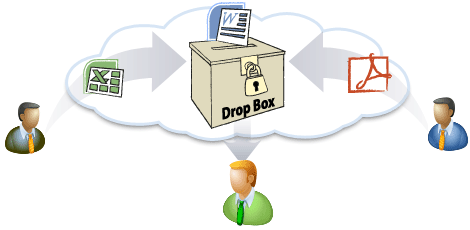 Anbody can drop files to you. DriveHQ account is not needed. Receive files from your own webpage
Details
Please watch theFeature Tutorial video:
-
Anybody Can Upload Files into a
The primary function of ais to allow non-DriveHQ members to upload files
to your private cloud folders without having to log on.
-
EmbedFolder: Receive Files from Your Own Web Page
Embed aFolder in your own website so that you can receive files from your users directly from your web pages.
-
Secure Upload Only
Users cannot see files that were uploaded to theby others.You (as theowner) have full access to the folder;you can also create a password for afolder.This way, users must have the password to
access the. Spammers cannot spam you unless they have the correct password.
-
Unlimited Number ofFolders
There is no limit to the number offolders in your account.
-
SynchronizedFolders
Create a synchronization task in DriveHQ FileManager to sync yourfolder.You can access files uploaded to the cloud-basedfolder from the synchronized local folder.
-
File Upload Notifications
You can assign email addresses to be notified when files are uploaded to afolder.
-
In addition to receiving files via theURL,
you can also receive files via the's email address.
-
Demos and Screenshots
First, create a folder and check the checkbox "This is afolder". If you have already created aFolder, you can simply log on to DriveHQ.com website, then from the DriveHQ Start Menu,
click "", you will
see a list offolders in your account.

ManageFolders
You can share or publish theURL to receive files from other users.You can also embed ain your own web page. For more info, expand the list to see the embed code. Click Preview to
see an example:

An example of embedding ain your own web page
File Drop Box Online Help

